
 Setting up apparatus
 Video capture & tracking
 Observing behaviour
 Connecting equipment
 Automating complex tests
 Running tests
 Results
 Visualising data
 Analysis
 Transferring data
 Open field
 Water-maze
 Y-maze
 Fear conditioning
 Novel object
 Barnes maze
 Radial arm maze
 Light/dark box
 Operant conditioning
 Zebrafish
 Computers
 Multifunction remote
 Accessories
 Digital interface
 Optogenetic interface
 Synchronisation interface
 Relay interface
 Audio interface
 Touch interface
 Analogue interface
 USB TTL cable
 Animal shocker
 Components
 Place preference
 ANY-box
 T-maze
 Zero maze
 Hole board
 Sociability cage
 OPAD
OPAD RAPC
RAPC Waterwheel forced swim test
 Thermal gradient ring
 Operon
 Activity Wheel
 Full ANY-maze licence
 Other licence types
 Developing countries licence
 Contact support
 Support Policy
 FAQs
FAQs Guides
 Downloads
 Send us files
 Activate a licence ID
 Documentation
 Contact us
 Blog
Blog About
About Testimonials
 Privacy Policy
As you may know, ANY-maze will automatically record videos of your tests performed with a camera. By default, it will name these video files with the ANY-maze test number (e.g., Test 1.szv), but you can change this to a custom file naming system.
To do this, open your ANY-maze file and go to Protocol > What to record while testing. You can type freehand text and add pre-defined fields using the button to the right. The pre-defined fields (shown below) will be filled in automatically by ANY-maze when saving the video files.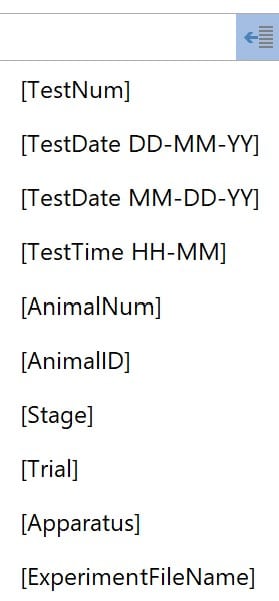
Note that pre-defined fields will only insert the value of that field, so you’ll probably want to include descriptive text before each field to describe what it is. For example, if your file naming system exclusively uses pre-defined fields, such as “[TestNum] [AnimalNum]”, the video file will be something like “1 1.szv”, which is not very useful.
Instead, you can type “Test [TestNum] Animal [AnimalNum]” for a more explanatory file name: “Test 1 Animal 1.szv”.

A final detail to be aware of is the difference between [AnimalNum] and [AnimalID]. The former uses ANY-maze’s automatic numbering system, and the latter uses your own animal IDs. To learn how to add your own animal IDs to ANY-maze, click here.
As always, feel free to contact us at [email protected] with questions.